Learn Quantum Computing by building circuits that run.
Drag gates onto qubit wires, run the circuit in your browser, and read the
result. Quanta — your AI quantum guide — explains what just happened, at your level.
No install. No credit card. 5 Quanta chats a day on the free plan.
14
Qubits simulated
9
Gates in the palette
6
Circuit templates
13
Guided chapters
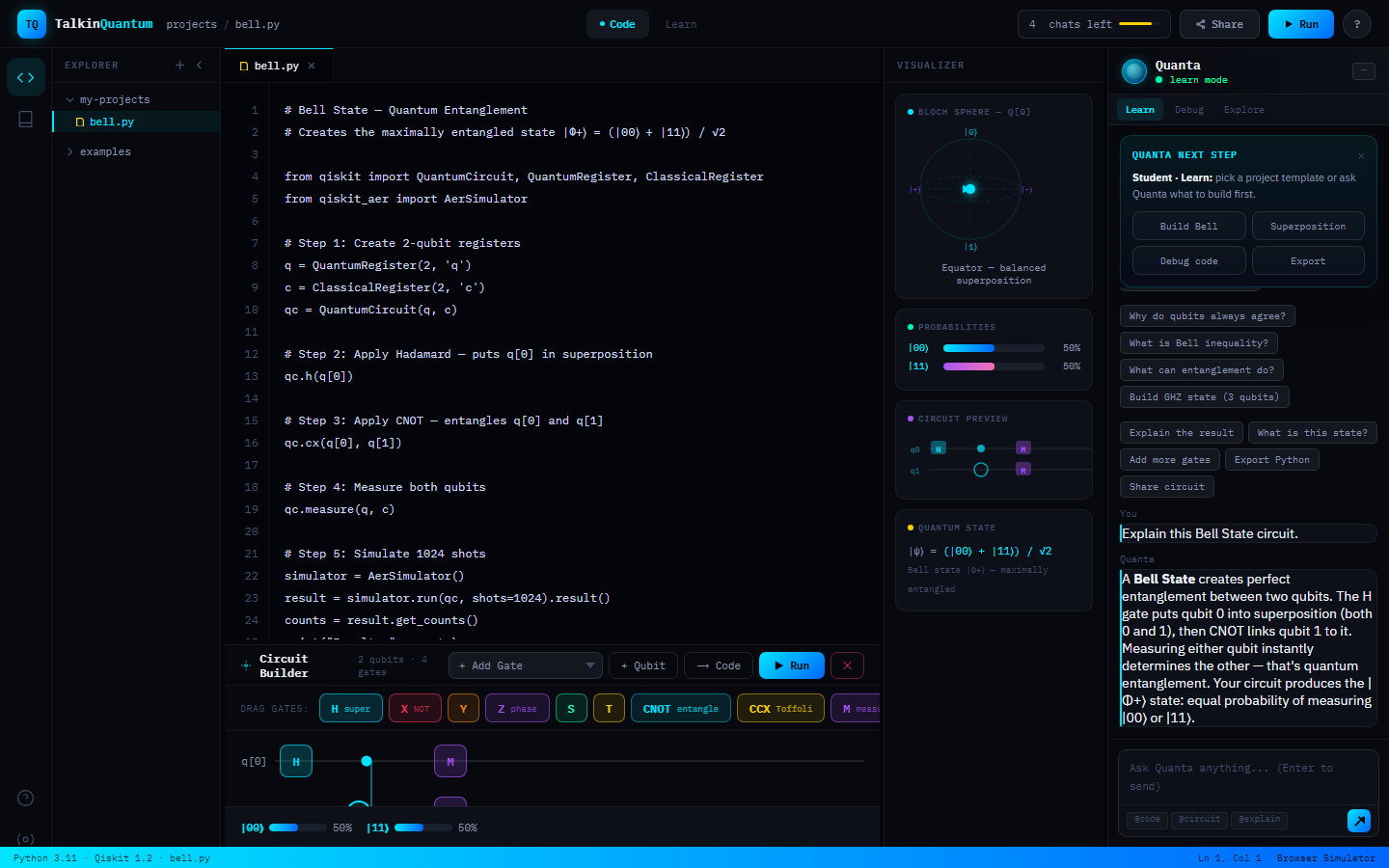
Bell state — the circuit the workspace opens with.
The workspace
This is the whole product — one screen
Editor, circuit grid, probability histogram, Bloch sphere and Quanta, side by side.
Place a gate and the simulation updates; press Run and the distribution is recomputed in the browser.
Thirteen chapters from qubits and superposition through entanglement, Qiskit, Grover's algorithm,
BB84 and error correction. Each lesson has an interactive visual and a short quiz; section quizzes
unlock the next level.
13 chapters · 3 sections · quiz-gated progression
Build and simulate circuits
Drag H, X, Y, Z, S, T, CNOT, Toffoli and measurement onto qubit wires. A statevector simulator runs
in your own browser — no account, no queue, no install — and the histogram and Bloch sphere update
as you place gates.
Up to 14 qubits · 16,384 amplitudes · runs locally
Ask Quanta about your result
In the workspace, Quanta is given the gates on your grid in the order they run, the code on your
screen and the outcomes of your last run — so "why do my qubits always agree?" gets an answer about
the circuit and the result in front of you. In Learn it is given the lesson you have open.
Explanations adapt across beginner, intermediate and expert.
3 explanation levels · reads your circuit, code and result · simulator-honest
The loop
Learn and Build are the same session
The lesson you are reading, the circuit on the grid and your conversation with Quanta
live in one workspace, and the conversation stays with you when you switch tabs.
Read a chapterOpen Learn and work through the lesson and its interactive visual.
Build it in the editor"Try This In Code" loads the matching circuit into the workspace and names the lesson you came from.
Run it and read the resultThe browser simulator recomputes the statevector and redraws the histogram and Bloch sphere.
Ask Quanta what happenedQuanta is given the gates in your circuit, in the order they run, and the outcomes of that run — and explains the result at your level.
What comes with every plan
Browser statevector simulator
Exact amplitudes up to 14 qubits, computed locally. Simulation only — TalkinQuantum has no quantum hardware.
Editable Qiskit Python
The circuit you build generates Qiskit code in the editor, and you can download it as a .py file.
Live histogram and Bloch sphere
Outcome probabilities and the q[0] state vector redraw as you edit the circuit.
Shareable circuit links
Copy a link that reopens your exact circuit for anyone who has it.
Pricing
One paid plan: the Advanced chapters and unlimited Quanta
The circuit builder, simulator, visualizations, templates, and the Basics and Intermediate
chapters are on the free plan. Pro adds the Advanced chapters and lifts the daily cap on Quanta
conversations.